Face To Text Style
A Chrome extension that maps facial expressions directly into text styles
A Chrome extension that uses facial tracking to translate your live expressions directly into rich text formatting as you type.
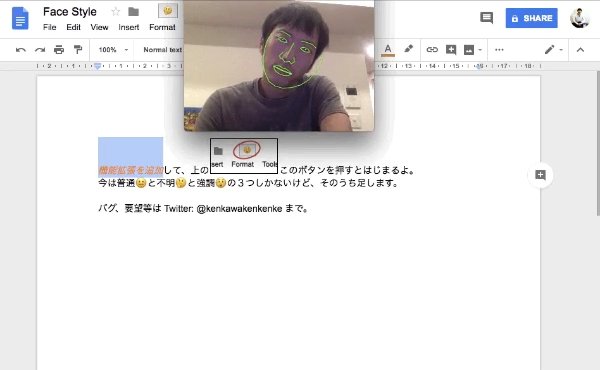
Expressive Meeting Notes
When taking rapid meeting notes, constantly reaching for the toolbar or hitting shortcut keys just to highlight an important point or mark a confusing detail disrupts typing flow.
The idea was simple: what if your face did the styling for you while your hands never left the keyboard?
How It Works
Using real-time webcam face-mesh tracking directly in the browser, the extension maps detected facial expressions to Google Docs text styling:
- Confusion & Concern: Looking puzzled shifts shifts the font to italics.
- Emphasis & Intensity: Looking angry automatically applies bold + red formatting.
Instead of keeping a flat, neutral poker face while typing notes, you react openly in front of the screen, producing documentation with embedded emotional tone.